What is Cloud Computing? An Introductory Guide

Cloud Computing is the on-demand delivery of computing power, databases, storage, applications, and other IT resources through a cloud services platform over the Internet, using a pay-as-you-go pricing model.
Cloud computing is an alternative to on-premise data centers, servers, and hardware management. It provides a vendor who handles all hardware components and maintenance.
Top Players in Cloud Computing
Amazon Web Services (AWS)
Microsoft Azure
Google Cloud Platform (GCP)
Alibaba Cloud
Oracle, VMware, IBM, Rackspace, Digital Ocean, CloudSigma, NetApp, etc
Characteristics of Cloud
On-demand self-service: Users can provision computing capabilities as needed automatically without requiring human intervention.
Broad Network Access: Capabilities are available over the network and accessed through standard mechanisms.
Scalability: Resources can be elastically provisioned and released to scale rapidly outward and inward commensurate with demand.
Resource Pooling: Using a multi-tenant model, the provider’s computing resources are pooled to serve multiple consumers.
Measured Services: Cloud systems automatically control and optimize resource use by leveraging a metering capability.
Deployment Model of Cloud
Public Cloud: These clouds are owned and managed by third-party cloud providers and are responsible for managing their infrastructure.
Private Cloud: These clouds are strictly used inside a single business. These may be present on-premise at the organization’s site or may be hosted by a third party.
Hybrid Cloud: These clouds are a combination of both public and private clouds and are maintained together using a set of rules that defines sharing of resources with different parties.
Services in the Cloud
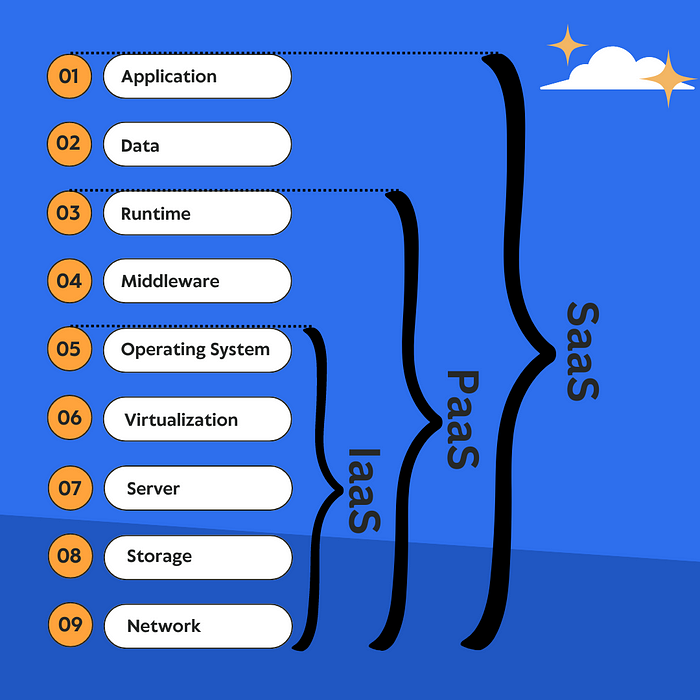
IaaS (Infrastructure as a Service): In IAAS, we can rent the IT infrastructure such as storage, server, network, virtualization, and operating system.
PaaS (Platform as a Service): PASS provides a complete development and deployment environment in the cloud, with resources that enable you to deliver everything from simple cloud-based apps to sophisticated, cloud-enabled enterprise applications.
SaaS (Software as a Service): SaaS allows users to connect to and use cloud-based apps over the Internet. Users connect to the application over the internet, usually with a web browser on their phone, tablet, or PC.
Advantages of cloud computing
Cost Effective: Reduces cost for hardware infrastructure.
Speed: Provides resources within minutes and with high throughput.
Flexibility & Scalability: Resources can be increased or decreased according to the current requirement.
Productivity: Provides resources using less effort and with ease.
Reliability: Provides backup and recovery of resources with increased fault tolerance.
Security: Applies policies for data confidentiality, integrity, and availability.